
Simplifying School Choice
What is SchoolFinder?
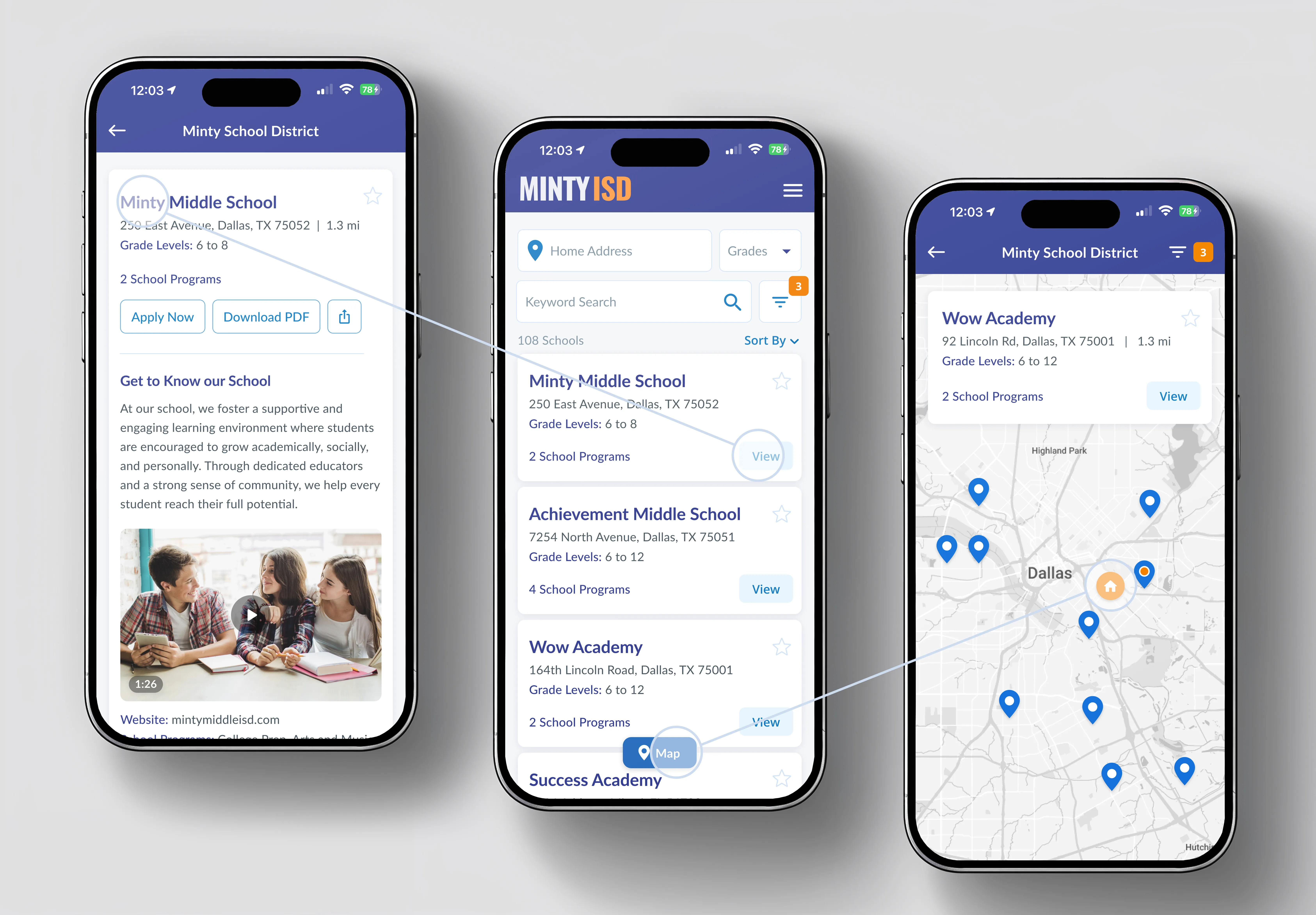
SchoolFinder is an all-in-one school search and comparison tool for families to make informed decisions about their child's education and allows school districts to showcase their schools effectively.
Challenge
Amid increasing school choice, families face the difficult task of searching, comparing and selecting schools. Overwhelmed by missing, outdated, or conflicting information, their decision often shifts from being fact-based to being driven by uncertainty. For schools the biggest challenge is providing and keeping school information up-to-date in a proficient and sustainable way.
Objectives
- Simplify School Search: Create a user-friendly platform that enables families to easily find, compare and apply to schools based on their location, program offerings, and other relevant criteria.
- Facilitate School Comparison: Provide families with the tools to compare schools side-by-side, considering factors such as school rating, academic performance, extracurricular activities, and facilities.
- Improve Information Management: Ensure that school districts can easily maintain accurate and up-to-date information about their schools.
- Analytics & Enrollment: Seamless integration with our other school tools to have access to actionable data and boost enrollment.
My Role
I led discovery and design for the SchoolFinder website and CMS App since the outset in early 2023.
Up until Feb 2026, I led efforts to evolve the service to maximize its rich analytics potential to help educators maximize their enrollment initiatives.
The discovery phase was a critical step in understanding the complex landscape of school choice, the challenges faced by families, and the pain points experienced by school districts.
For this project we focused our discovery efforts in three ways:
Stakeholder Interviews
We conducted in-depth interviews with various stakeholders involved in the school choice process, including school district administrators and subject matter experts. These interviews aimed to uncover their pain points, needs, and aspirations related to school selection and information sharing.
Key findings from these interviews included:
- Schools expressed challenges in keeping school data current and accessible to families
- School districts highlighted the importance of a platform that could showcase their schools effectively to boost enrollment and trust in their community
User Surveys Focused on the Family Experience
We distributed user surveys to a broad audience of guardians/parents. The survey asked about their current methods for searching and selecting schools, what information they found most relevant, and the difficulties they encountered during the process.
Key survey findings included:
- Most parents relied on a combination of online search, word-of-mouth, and district websites to gather information about schools
- Consistently, parents cited the need for accurate and easily accessible data as their top priority when choosing a school
- Many respondents expressed interest in a single platform that would simplify the research and application process
- Families mentioned these as important when choosing a school:
- Proximity to home
- Academic performance and school raiting
- Transportation availability
- Academic programs
- Extracurricular activities
- Student body diversity
In Summary
The research phase for SchoolFinder provided valuable insights into the challenges and needs of our audience.
These insights served as the foundation for the development of its features, design, and overall strategy, with a strong emphasis on addressing pain points and improving the user experience.
Based on our research and discovery efforts, we prioritized the following key features for SchoolFinder 1.0
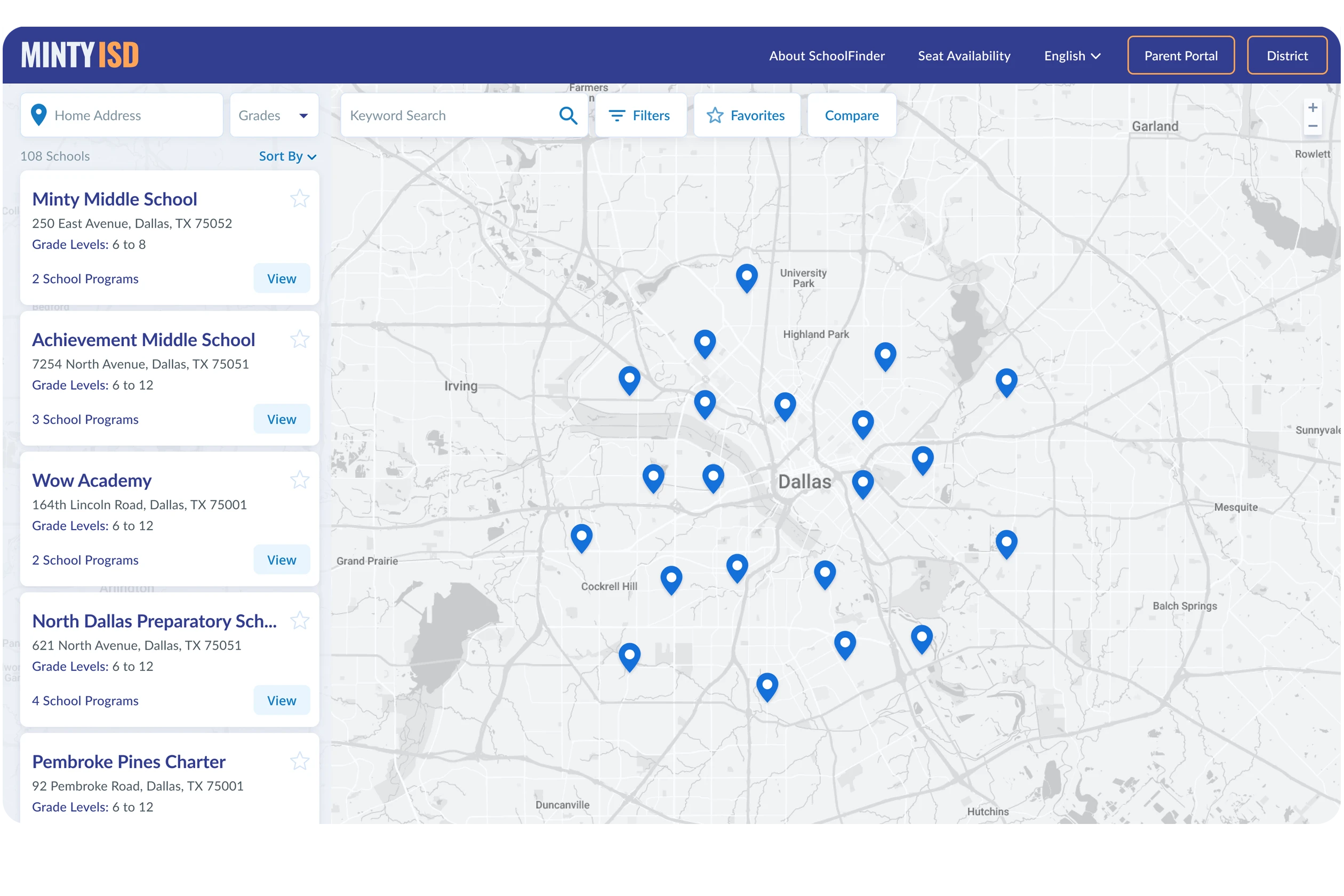
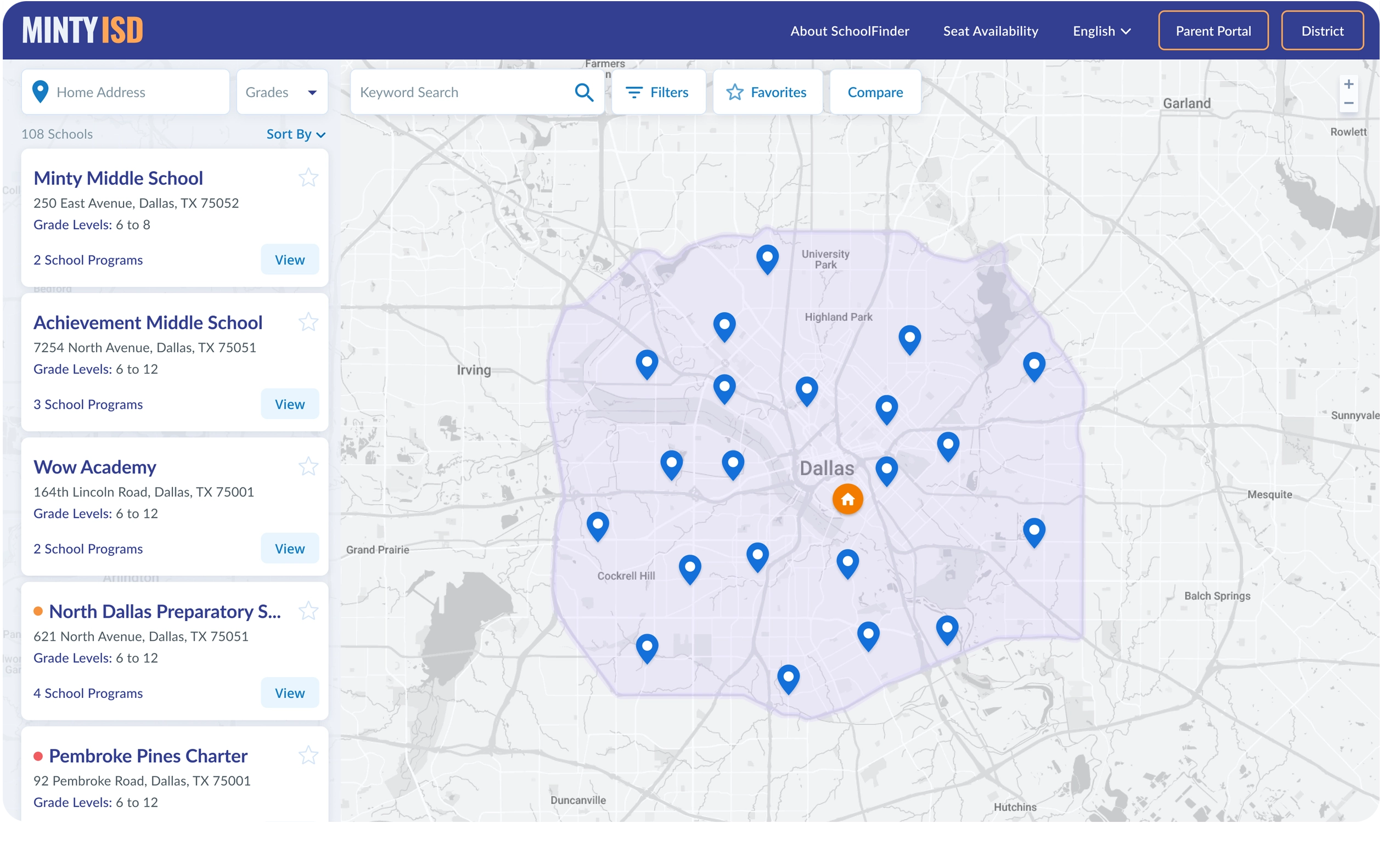
- Map & Neighborhood School: An intuitive map view will be at the center of our design, combined with a powerful school boundary management integration from our enrollment product, families can easily find their assigned neighborhood schools.
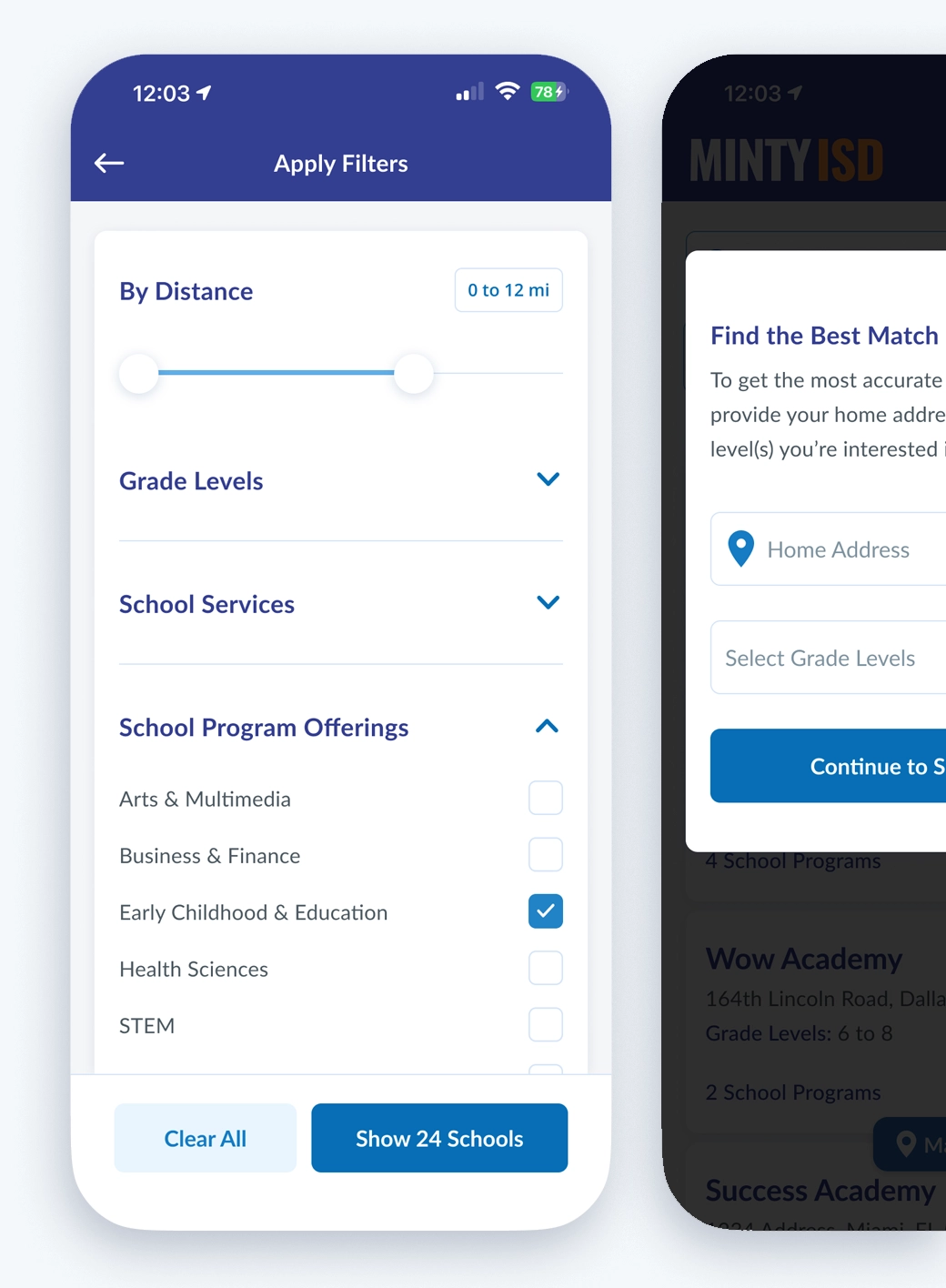
- Cascading and Advance Filtering: Provide a powerful and intuitive way to connect families with schools through prompts, like grade level, home address or an optional guided search.
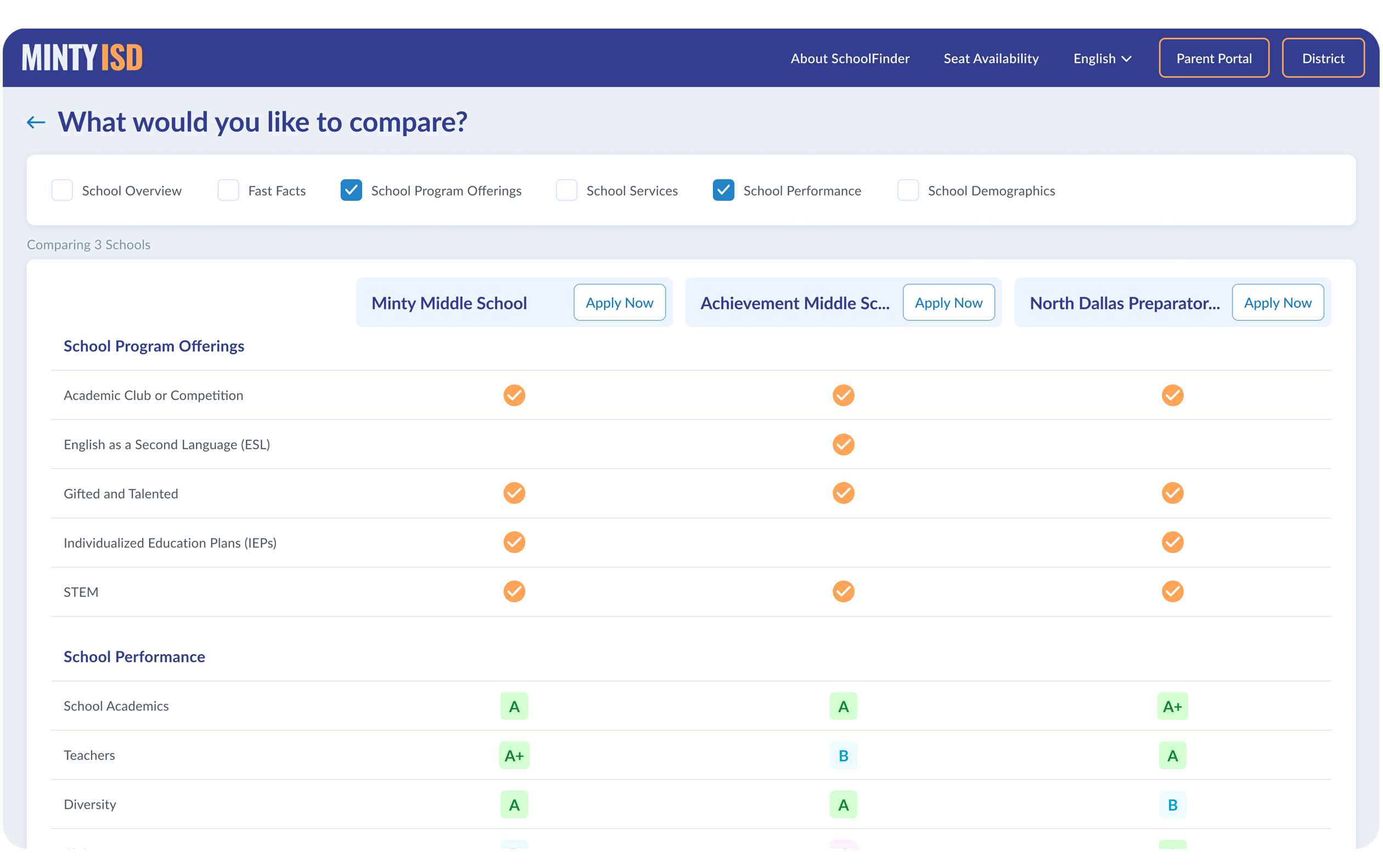
- Compare Schools & Programs: Develop features that enable users to compare multiple schools side-by-side, on all or some of their metrics, like demographics, performance data, photos, videos and more.
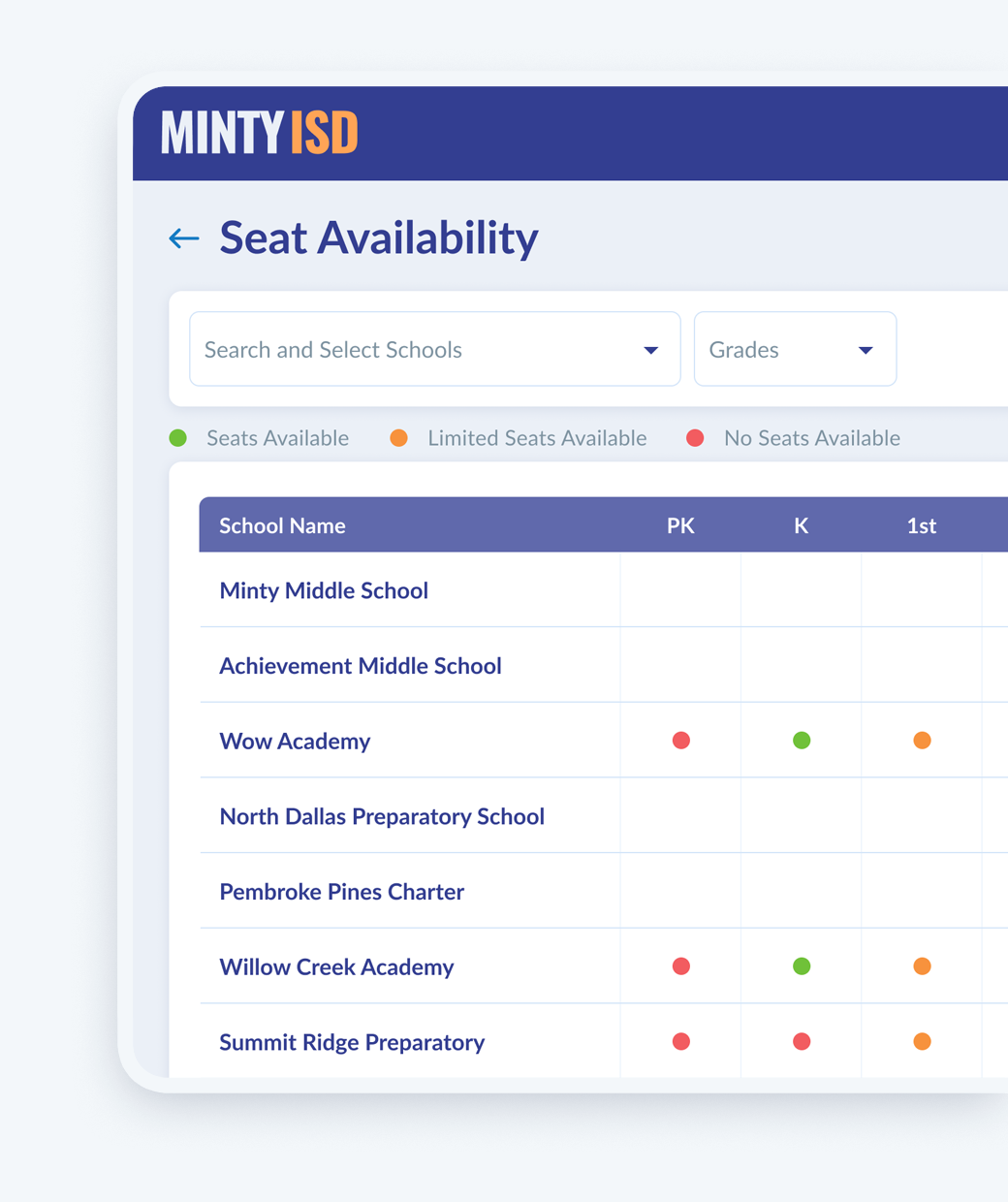
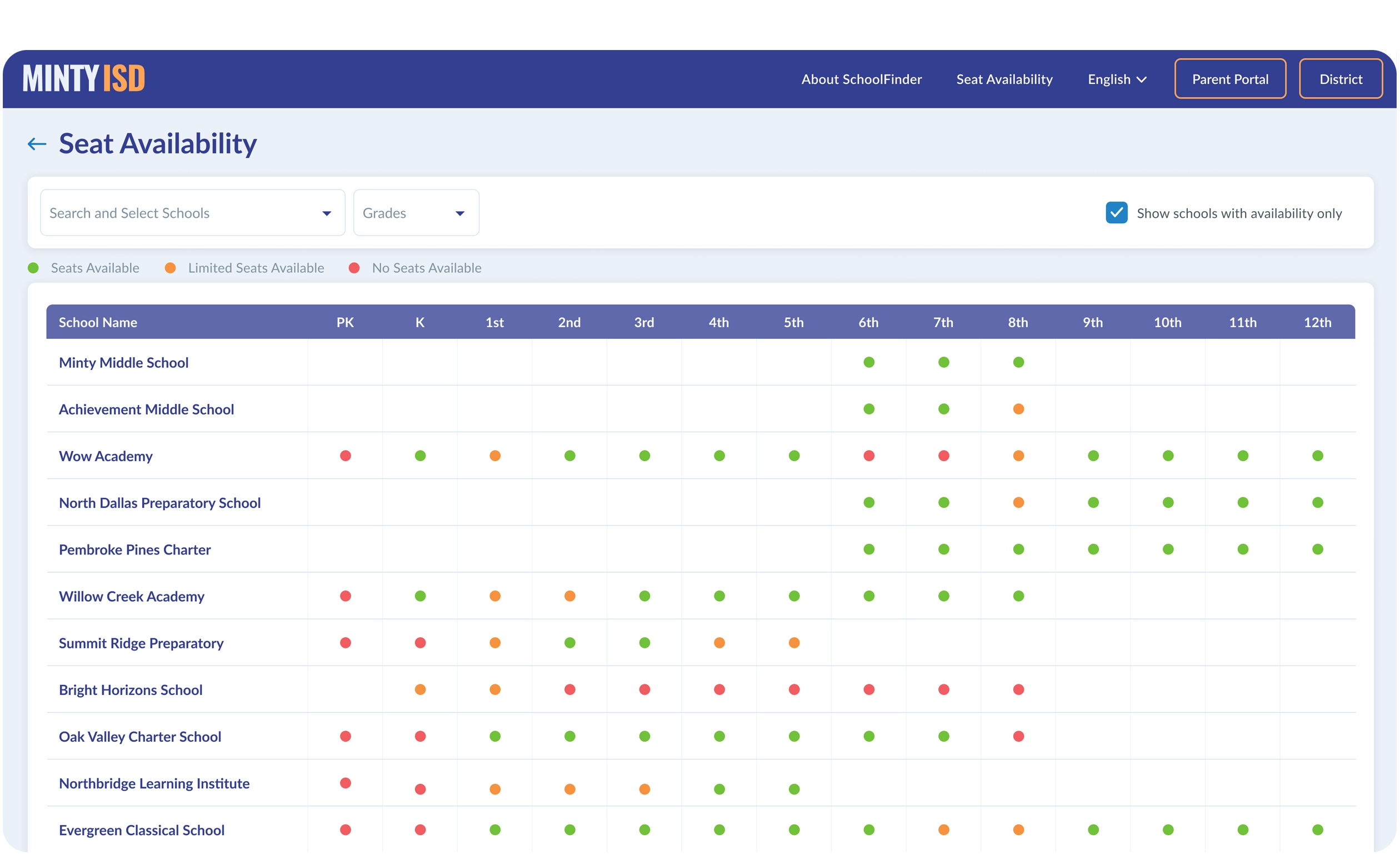
- Seat Availability, Add to Favorites & Share: Ability to easily see school and grade level availability, save your favorite choices and share results with loved ones.
- Data Accuracy and Maintenance: Implement an easy-to-use Content Management System (CMS) that enables admins to bulk manage and maintain school information regularly, ensuring the accuracy of data presented to families.
- Seamless Experience: Creating a seamless process that allows families to apply to multiple schools with ease.
- Analytics Integration: Unlock the rich analytics potential by informing admins on demand for specific services or programs and what areas these searches are coming from.
03 Design and Prototyping
It is important to note that during this phase, design and dev management have to work closely together. Developers have to understand the overall goals and functionality that we are trying to achieve, while always keeping user experience in mind. At this point we discuss database architecture, component library, accessibility best practices, possible challenges and integration with our enrollment product.
To ensure SchoolFinder provides the best possible experience to users, we followed the following steps:
Task and User Flows
This step allows you to look into the potential paths a user can take for each key feature. It is important to analyze and understand all the decisions a user might have to make during a task. This way, we are able to design the most intuitive way to guide our users. Also, helps us list and plan for all scenarios, edge cases and testing.
Wireframes
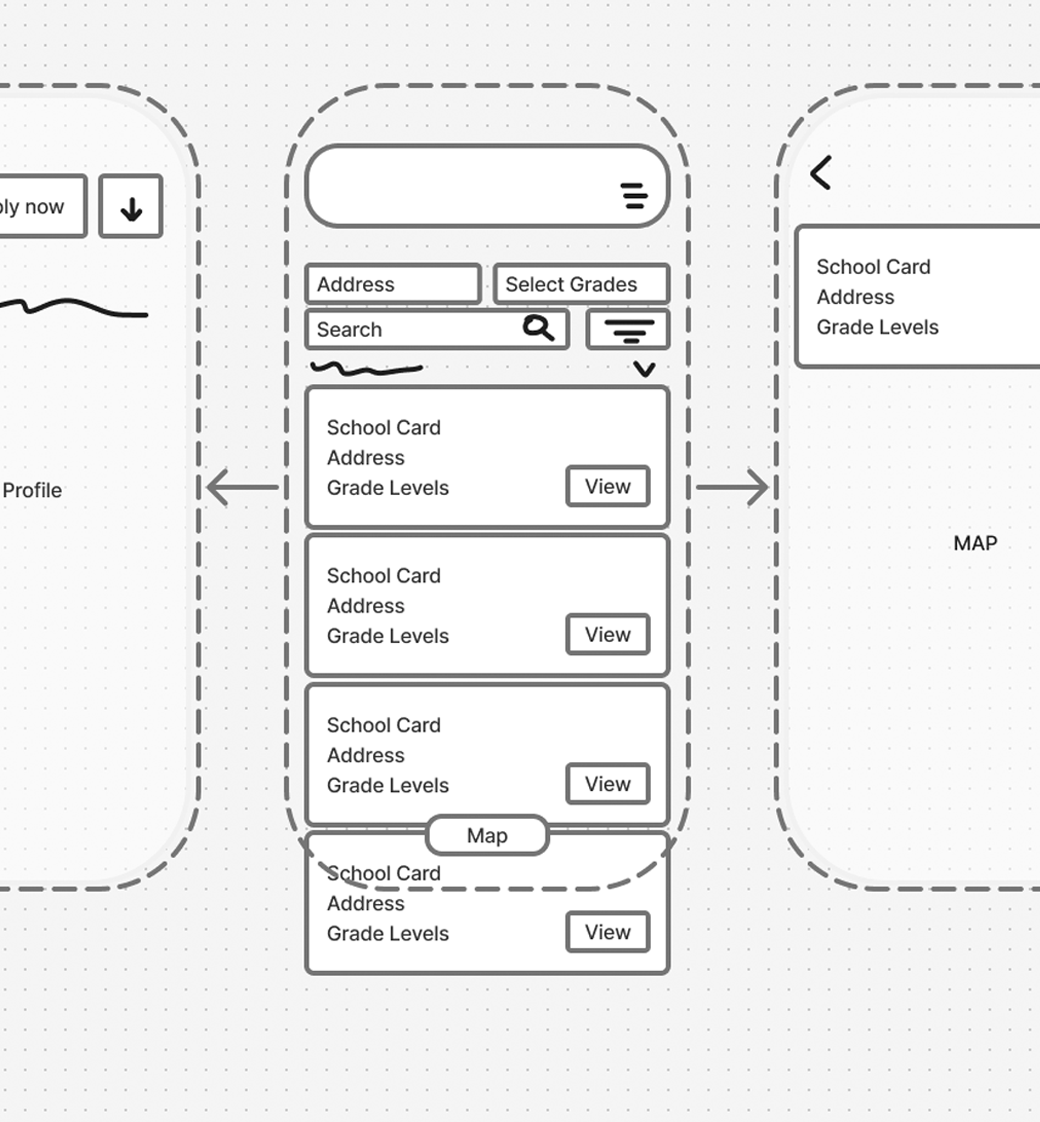
With all the information collected, I was able to start on the visual representation of the product's layout, structure, and overall functionality. These low and mid fidelity wireframes let us turn our ideas into visuals that can be easily understood. This is a great time to get feedback from stakeholders, developers and potential clients. This allows us to make adjustments as necessary early in the development process.
Design & Prototypes
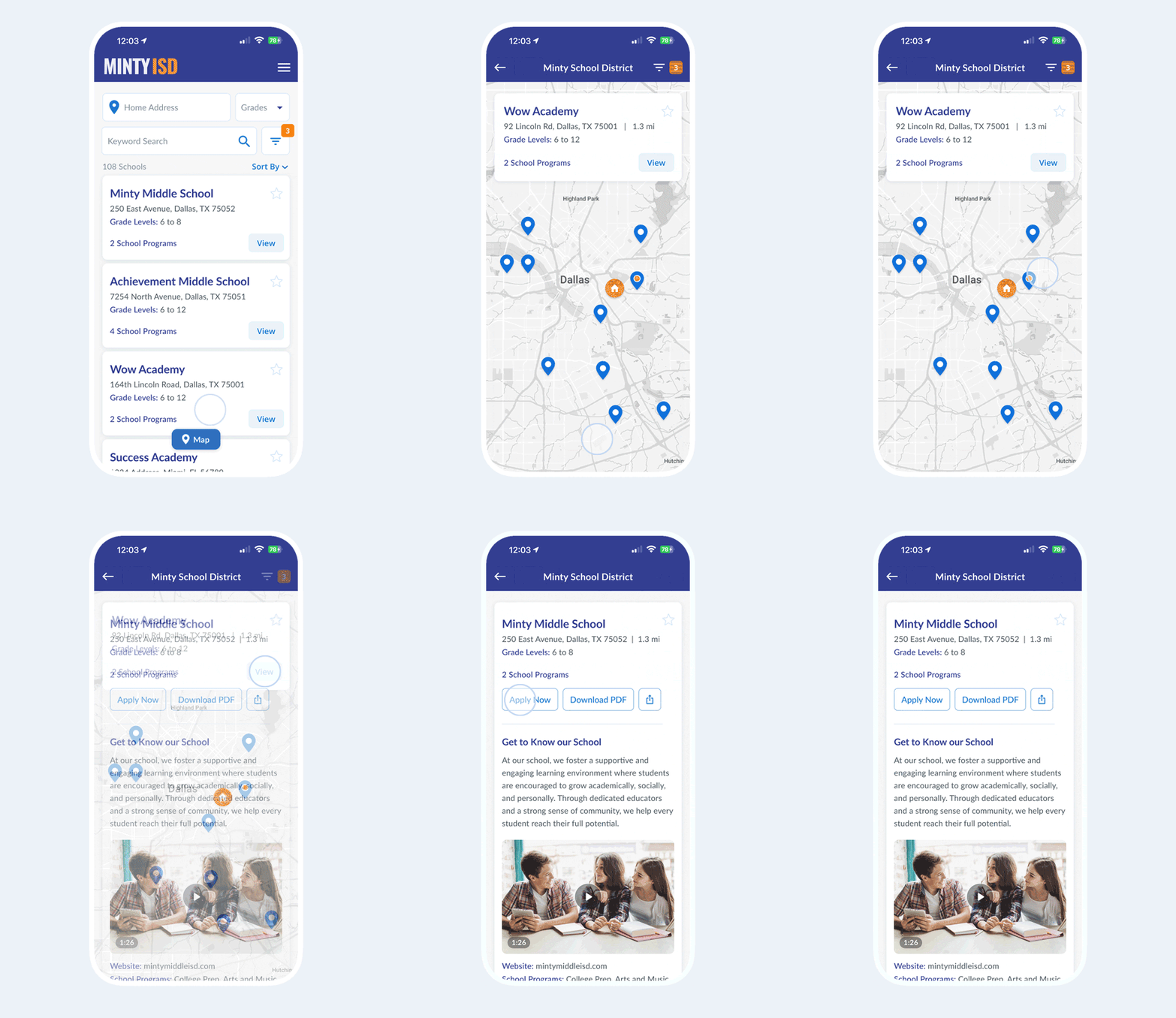
This is for me one of the most satisfying steps in the process. When everything comes together into a tangible visual representation of the product. It is what our users will interact with and it is what would define their overall user experience. It also plays a crucial role by facilitating design validation, feedback, reducing risks, improving communication, supporting iterative development, and serving various other functions that contribute to the successful creation of a high-quality product.
04 Testing and Launch v1.0
It is important to define clear objectives during test planning. Some of the various items we wanted to test are assumptions, navigational structure, performance, ease of use, and overall user experience.
Usability Testing and Iterate Cycle
With help from our Customer Experience team, we put together a group of School Admins that might be interested in a product like SchoolFinder. The feedback gathered helped drive iterative improvements. We focused on effectiveness, usability, refining the UI, and enhancing the setup options based on user suggestions.
Testing the School Admin Flow
It is as important to test the setup, management, performance and overall experience of SchoolFinder admin flows. Admin users have faced challenges in the past with non-intuitive systems or performance issues, which can make maintenance impossible. To address this, we selected a group of school admins from small and large organizations, with diverse needs. This selection makes them an ideal choice for conducting comprehensive testing of the platform.
Testing the Family Flow
Internal and external testings were conducted by the product team to identify any issues with the family flows and refine the platform. We were able to test SchoolFinder with colleagues and friends that have school age children and have been through the School Choice enrollment process.

Impact
SchoolFinder has helped districts across the country connect with families and grow enrollment. In one example, a Michigan school district used SchoolFinder to enroll 1,200 students in two struggling schools.
- 476k+ school searches per year
- 320K+ program/services searches per year
- 115K+ school comparisons per year
Overall it is very satisfying to help school organizations connect with families in the best possible ways. It is easier to build a product that you believe would have a positive impact on the education of many children.
The team and I took this work very seriously and we are glad we included some features like “View Seat Availability” or “Add to Favorites” for SchoolFinder 1.0. In the past I have seen this kind of very helpful, but not critical features, get pushed for later releases.
In the future, we plan to continue refining SchoolFinder based on its evolving needs, ensuring that it remains a valuable resource for both families and schools in the ever-changing landscape of education.
